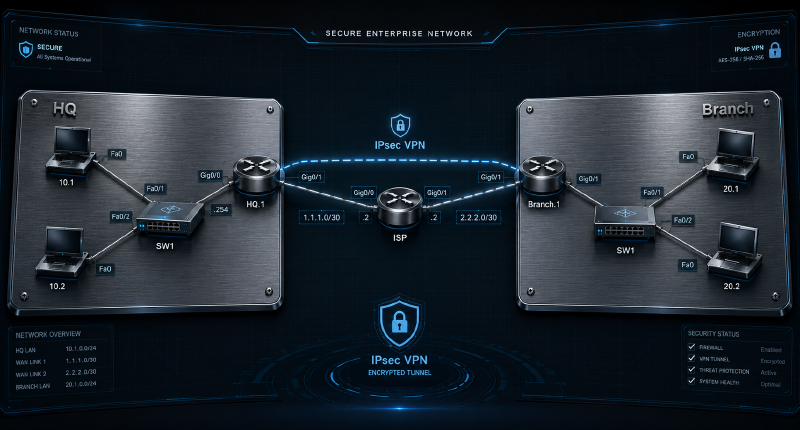
Project Overview#
This project demonstrates the design and configuration of a secure Site-to-Site IPsec VPN tunnel between two corporate networks (HQ and Branch) over an untrusted Public ISP infrastructure using Cisco IOS.
The objective of this project is to provide a secure communication channel between two geographically separated LANs. By implementing an IPsec tunnel, we ensure that internal traffic remains encrypted and invisible to the Internet Service Provider (ISP).
🛠️ Technical Stack#
- IPsec (Internet Protocol Security): Ensures data confidentiality, integrity, and authentication.
- IKE Phase 1 (ISAKMP): Negotiates security associations and establishes a secure management plane.
- IKE Phase 2 (IPsec SA): Defines how the actual data is encrypted and transferred.
- AES-256 & SHA: Advanced encryption and hashing standards used for maximum security.
- Cisco IOS Security Features: Leveraging the
securityk9technology package.
📊 Addressing Table#
| Device | Interface | IP Address | Description |
|---|---|---|---|
| HQ-Router | Gig0/0 | 1.1.1.1/30 | Public Facing (Internet) |
| HQ-Router | Gig0/1 | 192.168.10.1/24 | HQ LAN Gateway |
| ISP-Router | Gig0/0 | 1.1.1.2/30 | HQ Service Termination |
| ISP-Router | Gig0/1 | 2.2.2.2/30 | Branch Service Termination |
| BR-Router | Gig0/0 | 2.2.2.1/30 | Public Facing (Internet) |
| BR-Router | Gig0/1 | 192.168.20.1/24 | Branch LAN Gateway |
🔬 Verification & Proof of Concept#
To demonstrate that the tunnel is operational and traffic is being encrypted,
the following verification steps were performed:

========================================================================
1. Phase 1 State (ISAKMP SA)
========================================================================
The command 'show crypto isakmp sa' confirms that the management tunnel
is established.

HQ# show crypto isakmp sa
IPv4 Crypto ISAKMP SA
dst             src             state          conn-id status
1.1.1.1         2.2.2.1         QM_IDLE           1001 ACTIVE

Expected State: QM_IDLE (Indicates a successful, authenticated session).


========================================================================
2. Phase 2 Data Flow (IPsec SA)
========================================================================
The command 'show crypto ipsec sa' provides proof of encryption.
By monitoring the packet counters, we can confirm the data is flowing
through the secure tunnel.

HQ# show crypto ipsec sa
interface: GigabitEthernet0/0
    Crypto map tag: MYMAP, local addr 1.1.1.1

   protected vrf: (none)
   local  ident (addr/mask/prot/port): (192.168.10.0/255.255.255.0/0/0)
   remote ident (addr/mask/prot/port): (192.168.20.0/255.255.255.0/0/0)

   #pkts encaps: 45, #pkts encrypt: 45, #pkts digest: 45
   #pkts decaps: 45, #pkts decrypt: 45, #pkts verify: 45

Key Counters to Monitor:
- #pkts encaps: Number of packets encrypted and sent through the tunnel.
- #pkts decaps: Number of packets received and decrypted from the tunnel.


========================================================================
3. ICMP Connectivity Test
========================================================================
A ping was initiated from HQ-PC (192.168.10.x) to Branch-PC (192.168.20.x)
to test end-to-end connectivity across the secure path.

HQ-PC> ping 192.168.20.10

Pinging 192.168.20.10 with 32 bytes of data:
Reply from 192.168.20.10: bytes=32 time=12ms TTL=126
Reply from 192.168.20.10: bytes=32 time=10ms TTL=126

Ping statistics for 192.168.20.10:
    Packets: Sent = 4, Received = 4, Lost = 0 (0% loss)

Result: Success (0% loss after initial tunnel negotiation).
Verification: Continuous pinging results in an increase of the
encapsulation/decapsulation counters mentioned in Phase 2.