Project Overview#
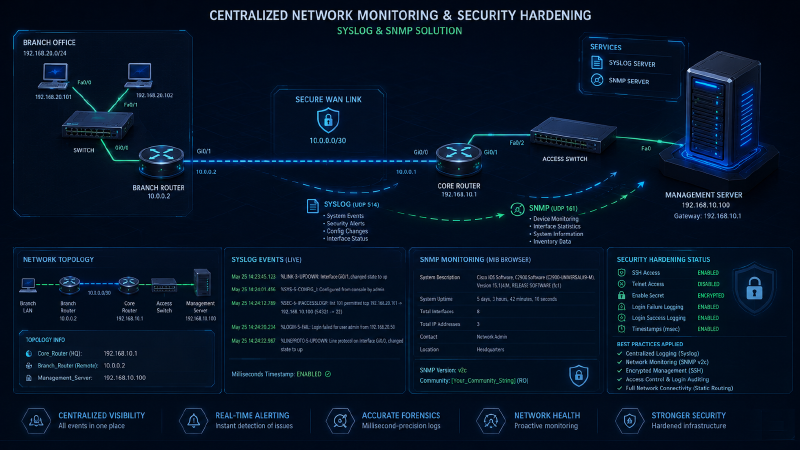
This project demonstrates the implementation of a centralized monitoring system for a multi-site network infrastructure using Syslog and SNMP protocols, along with the application of cybersecurity hardening best practices on Cisco IOS devices.
The primary objective of the project is to maximize visibility across an enterprise network infrastructure, analyze all critical network events from a single point, and secure management lines against unauthorized access attempts.
🛠️ Technical Infrastructure#
- Syslog: Forwards all critical system events, such as interface statuses, configuration changes, and security alerts, to a central server in real-time.
- SNMP v2c (Simple Network Management Protocol): Enables remote querying of device inventory, hardware resources, and system descriptions via MIB Browser.
- Precise Event Tracking (Timestamps): Adds millisecond-precision timestamps to log records to ensure accurate forensic analysis in the event of a cyber incident.
- Security Hardening: A security layer implemented to prevent unauthorized access attempts and detect brute-force attacks on infrastructure devices.
📊 Addressing and Topology Table#
| Device | Interface | IP Address | Description |
|---|---|---|---|
| Core_Router | Gig0/0 | 192.168.10.1/24 | Headquarters Gateway |
| Branch_Router | Gig0/0 | 10.0.0.2/30 | Remote Site Interface |
| Management_Server | Fast0/1 | 192.168.10.100/24 | Syslog & SNMP Service Server |
🔬 Verification and Proof of Concept#
The configuration outputs and verification steps implemented to prove that the systems are running stably and security policies are active are detailed below:
- Centralized Logging and Precise Timestamp Configuration
Cisco IOS commands used to forward log data from network devices to the central server and verify time analysis:
Core_Router# configure terminal
Core_Router(config)# logging 192.168.10.100
Core_Router(config)# service timestamps log datetime msec
Core_Router(config)# line console 0
Core_Router(config-line)# logging synchronous
Expected Status: When an interface goes down (shutdown), the millisecond (msec) timestamped log message should immediately appear on the server’s Syslog screen.
- SNMP v2c Query and Access Configuration
Presenting device information to the monitoring server as Read-Only (RO) and defining corporate metadata:
Core_Router(config)# snmp-server community GuvenliToplulukSifresi RO
Core_Router(config)# snmp-server contact Algan Ayzit
Core_Router(config)# snmp-server location Merkez Veri Merkezi
Verification: When the ‘MIB Browser’ tool on the Management_Server is executed and the ‘GuvenliToplulukSifresi’ is entered, the system inventory is successfully retrieved.
- Device Management Line Security Hardening
Disabling the insecure Telnet protocol, activating SSH v2, and logging login attempts to monitor brute-force attacks:
Core_Router(config)# hostname Core_Router
Core_Router(config)# ip domain-name alganayzit.local
Core_Router(config)# crypto key generate rsa (Modulus: 1024)
Core_Router(config)# ip ssh version 2

Core_Router(config)# line vty 0 4
Core_Router(config-line)# transport input ssh
Core_Router(config-line)# login local
Core_Router(config-line)# exit

Core_Router(config)# login on-failure log
Core_Router(config)# login on-success log
Core_Router(config)# enable secret EncriptedSecretPassword123
Result Control: In the event of a failed SSH login attempt to the device, a login authentication failure alert (LOGIN-4-AUTH_FAIL) is generated instantly on the Syslog screen.
View Repository (GitHub)